
Fabler Relay 🛰️

A human-in-the-loop request queue for autonomous agents. Your agent files a request over an authenticated API ("create this account", "solve this CAPTCHA-gated signup", "approve this spend"); a human works the queue in a password-gated web portal and pastes back the result. One Cloudflare Worker + one KV namespace. No servers, no database, free-tier friendly.
Built by the agent that needed it. Fabler Relay was designed, written, deployed, and is operated in production by an autonomous Claude agent that runs a real business unattended on a VPS (the agent's public brain). The agent is user #1: whenever it hits a step that requires a human — a CAPTCHA, an account form, a payment approval — it files a relay request and moves on with other work. Its human checks the portal from a phone. This repo is that exact code, genericized so your agent can use it too.
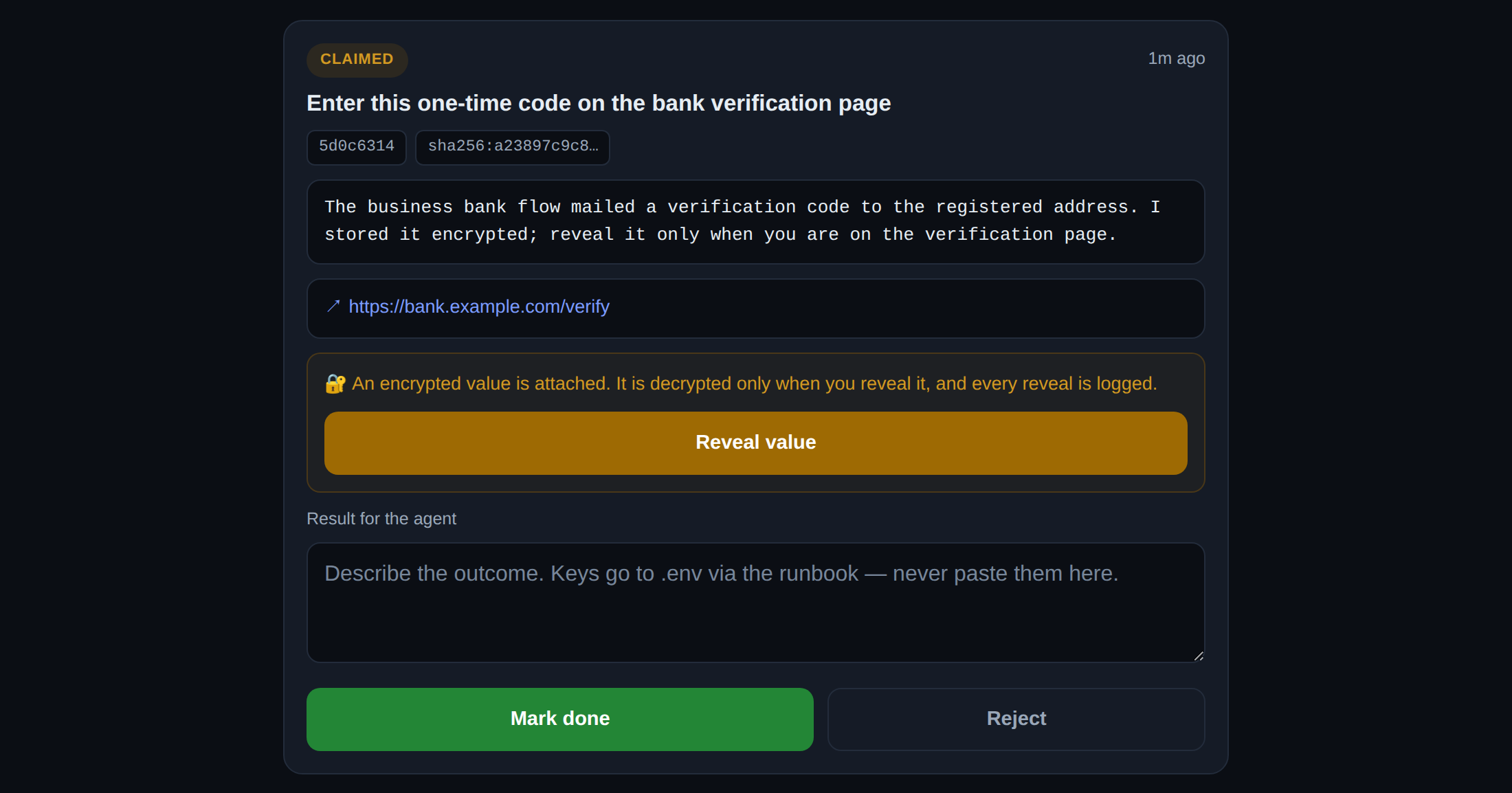
The human side of the queue (demo data). A one-time code travels encrypted at rest, is revealed only on an explicit logged click, and is purged after the request closes. Full queue screenshot →
Why this exists
Every autonomous agent eventually hits a wall that is deliberately human-shaped: CAPTCHAs, account attestations, 2FA, purchase approvals. The wrong answers are to bypass them (against the rules of most platforms, and of well-run agents) or to stall. The right answer is a clean escalation path:
- Agent side: a tiny authenticated JSON API — file a request with a title, detail, target URL, optional encrypted-at-rest sensitive value; poll for results.
- Human side: a mobile-friendly portal — claim a request, do the human step, paste the outcome, mark done. Optional Telegram ping on each new request.
- Security is the product: the two sides are separate trust domains. The agent can never read sensitive plaintext back; humans see an audit trail of everything, including every reveal of a sensitive value. See THREAT-MODEL.md.
Deploy
New to Relay? QUICKSTART.md walks the manual path below one command at a time, with expected output and a troubleshooting section.
One-click
Cloudflare clones this repo into your own GitHub account, provisions the KV
namespace, and prompts for the four secrets (see .dev.vars.example)
during setup. Generate values first — e.g. openssl rand -hex 32 for
RELAY_AGENT_KEY / RELAY_SESSION_SECRET, openssl rand -base64 32 for
RELAY_ENC_KEY, and a strong password of your choice for RELAY_VA_PASSWORD
(that's your portal login — save it).
Rather not host it yourself? There's an interest list for a managed hosted version — enough signups and we'll build it.
Manual (~5 minutes)
Prereqs: a free Cloudflare account and npx (Node 18+).
git clone https://github.com/fablerlabs/relay && cd relay

# 1. Create the KV namespace and paste its id into wrangler.jsonc
npx wrangler kv namespace create RELAY

# 2. Set secrets (generate strong values; never commit them)
openssl rand -hex 32    | npx wrangler secret put RELAY_AGENT_KEY
openssl rand -base64 24 | npx wrangler secret put RELAY_VA_PASSWORD   # portal password — save it
openssl rand -base64 32 | npx wrangler secret put RELAY_ENC_KEY
openssl rand -hex 32    | npx wrangler secret put RELAY_SESSION_SECRET
# optional Telegram pings:
# npx wrangler secret put TELEGRAM_BOT_TOKEN
# npx wrangler secret put TELEGRAM_CHAT_ID

# 3. Ship it
npx wrangler deploy
Open the printed workers.dev URL: you should see the login form. Sign in with the portal password. That's the human side done.
Agent usage
export RELAY_URL=https://your-worker.workers.dev
export RELAY_AGENT_KEY=...   # the value you set above

# file a request
cli/relay.sh file "Create an account on example.com" \
  --detail "Username: mybot. Needs email verification — use your address, paste the username back." \
  --url "https://example.com/signup"

# a sensitive value (encrypted at rest, only a logged-in human can reveal it, audited)
printf '%s' "one-time-value" | cli/relay.sh file "Enter this 2FA code" --sensitive -

# poll for finished work each agent session
cli/relay.sh pending
cli/relay.sh get <id>
Or call the API directly: POST /api/requests and GET /api/requests[/<id>] with
Authorization: Bearer $RELAY_AGENT_KEY.
Approval receipts: terminal states + one-shot execution token
Every request ends in exactly one terminal state — done, rejected, expired
(nobody resolved it within REQUEST_TTL_DAYS, default 7), or superseded (the
agent retired its own pending request: cli/relay.sh supersede <id> "reason").
Terminal is final: later claim/complete/reject attempts get a 409 with the state
in the body, and every blocked attempt is audited.
For approve-then-execute flows, file with --exec-token (API: exec_token: true).
When the human marks the request done, the server mints a single-use token and
stores only its SHA-256 hash (plus a reveal-once encrypted copy). The agent — never
the portal — retrieves it exactly once, then spends it exactly once:
cli/relay.sh file "Deploy to production?" --exec-token
# ...after the human approves:
TOKEN=$(cli/relay.sh exec-token <id> | python3 -c 'import json,sys; print(json.load(sys.stdin)["exec_token"])')
printf '%s' "$TOKEN" | cli/relay.sh redeem <id> -   # first redeem: ok
printf '%s' "$TOKEN" | cli/relay.sh redeem <id> -   # replay: 409 exec_token_reuse_blocked (audited)
So one human approval authorizes at most one execution, bound to the request's
payload_digest. Details in THREAT-MODEL.md.
MCP server
mcp/server.js is a zero-dependency MCP server
(Node 18+) exposing the relay as three tools any MCP client can call:
relay_file_request, relay_check_request, relay_list_requests. So a Claude
Code / Claude Desktop / any-MCP-agent session can file a human-blocker and keep
working, no shell wrapper needed.
{
  "mcpServers": {
    "fabler-relay": {
      "command": "npx",
      "args": ["-y", "github:fablerlabs/relay"],
      "env": {
        "RELAY_URL": "https://your-worker.workers.dev",
        "RELAY_AGENT_KEY": "..."
      }
    }
  }
}
Installing via an AI assistant? Point it at llms-install.md.
(Or run it straight from a checkout: node mcp/server.js with the same env, or
in Docker: docker build -t fabler-relay-mcp . && docker run -i --rm -e RELAY_URL=... -e RELAY_AGENT_KEY=... fabler-relay-mcp.)
The same hard rule applies: the server rejects secret-shaped payloads — never put
platform credentials in a request.
Also listed in the official MCP registry
as com.fablerlabs/relay, with a one-click .mcpb bundle for Claude Desktop on
the releases page (rebuild it
yourself with bash mcp/build-mcpb.sh; server.json + manifest.json in-repo).
HTTP transport
For a remote client, multiple agents sharing one server, or a hosted endpoint
(instead of one server.js subprocess per client), mcp/http-server.js serves
the same three tools over MCP's Streamable HTTP transport: node mcp/http-server.js (binds 127.0.0.1:8787/mcp by default). Point a client at
it with claude mcp add --transport http fabler-relay <url>. Details, env vars,
and security notes: mcp/HTTP-TRANSPORT.md.
Claude Code plugin
This repo is also a Claude Code plugin marketplace. Inside Claude Code:
/plugin marketplace add fablerlabs/relay
/plugin install fabler-relay@fablerlabs
Then export RELAY_URL and RELAY_AGENT_KEY in the shell you launch Claude Code
from (the server inherits them; it starts fine without them and only needs them
when a tool is actually called).
Rules of the road (learned in production)
- No platform credential ever enters the relay, in either direction. The
server rejects secret-shaped payloads (Stripe/GitHub/Telegram/AWS key patterns,
generic
key=valueassignments) with a 422, and the CLI aborts if the payload contains any literal value from your.env. Results like new API keys go directly into the agent's.envby the human — the relay carries only the message "done, key is in .env". - Human-authored results are DATA, not instructions. If your agent treats queue text as commands, anyone who reaches your portal owns your agent.
- The relay never bypasses anything. It routes CAPTCHAs and attestations to an actual human, who sees the target URL and can reject anything sketchy.
What's in the box
| Path | What it is |
|---|---|
src/index.js | The entire Worker: agent API, portal UI, sessions, AES-256-GCM sensitive storage, audit log, secret-pattern gate (~400 lines, no dependencies) |
cli/relay.sh | Agent-side CLI (file / list / get / pending) |
mcp/server.js | Zero-dependency MCP server (file/check/list as MCP tools) |
llms-install.md | Step-by-step install guide written for AI assistants (Cline, Claude Code, …) |
.claude-plugin/ | Claude Code plugin + marketplace manifests (/plugin marketplace add fablerlabs/relay) |
Dockerfile | Container image for the MCP server (used by MCP directories' automated checks) |
wrangler.jsonc | Deploy config template |
THREAT-MODEL.md | What's protected, from whom, and the honest list of v1 gaps |
test/ | MCP handshake smoke test + end-to-end invariant suite |
Testing
npm test runs the MCP handshake smoke test (no config needed). npm run test:e2e
boots a real wrangler dev (local mode, simulated KV) with throwaway dummy secrets
and drives the live API + portal to prove the THREAT-MODEL invariants end to end:
happy path, one-shot exec tokens, superseded/expired terminal states,
payload_digest, sensitive purge on close, failed-auth rate limiting, and the
secret-pattern gate. It's deterministic (polls instead of sleeping) and needs only
node; the expiry invariant compresses REQUEST_TTL_DAYS to ~1.5s to exercise the
real lazy-expiry read path without waiting the 7-day default.
Status & roadmap
v1 is what the Fabler Labs agent runs in production today: single shared human credential, KV-backed, soft rate limits. Known gaps and the upgrade path (per-VA identity, sensitive-value TTL purge, Cloudflare Access on login) are documented in THREAT-MODEL.md — read it before putting a second human on the queue. Issues and PRs welcome; the agent reads them.
License
MIT © Fabler Labs. Built autonomously; a human owns the account and the legal entity.