
vidgrid





Convert video clips into annotated image grids for vision LLM analysis. One cell = one second, by default.
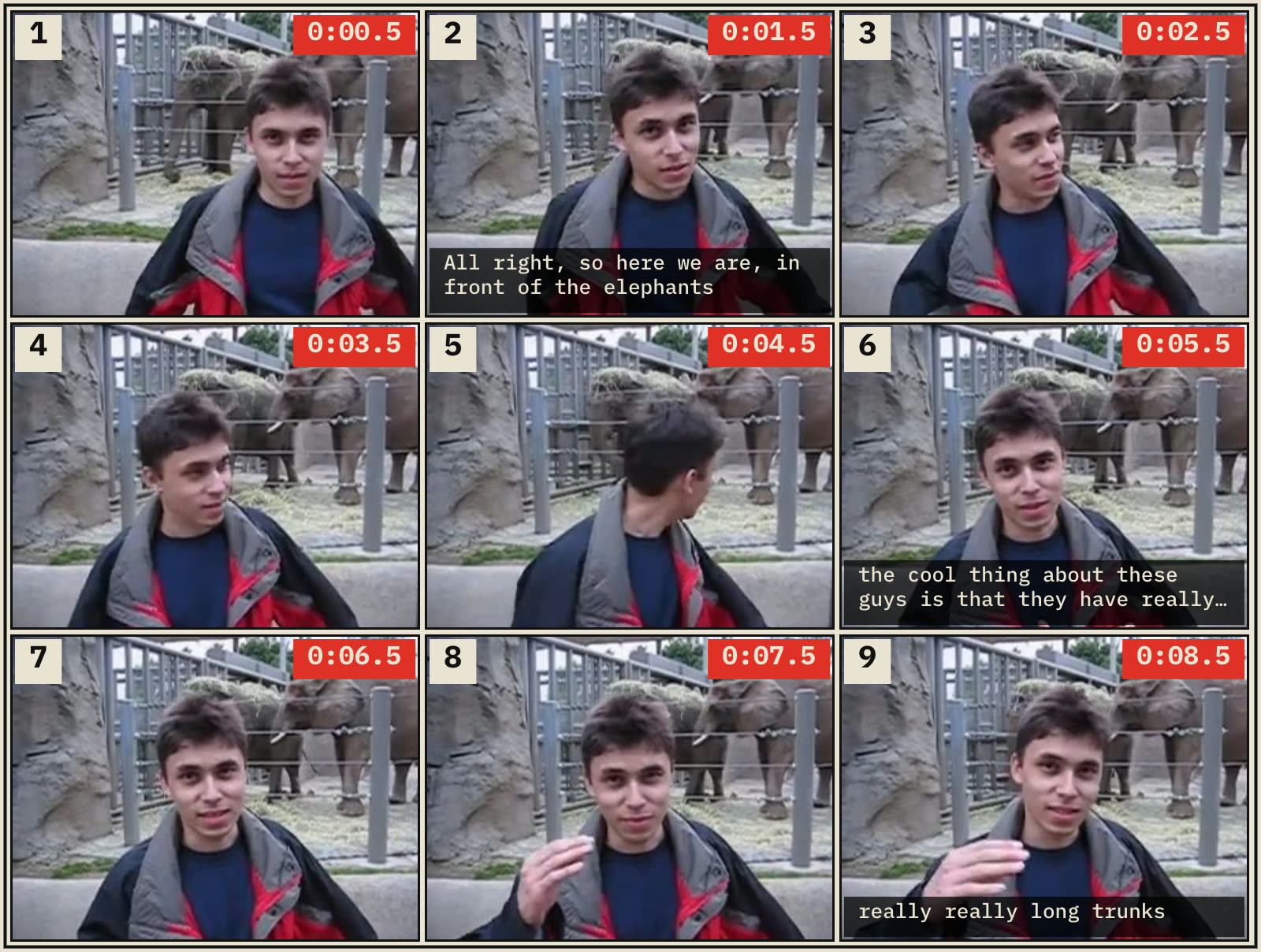
LLMs can't watch video, but they can analyze a single image. vidgrid samples
one frame per second from a video, tiles them into a numbered storyboard with
timestamps, and optionally sends the result to Claude, GPT, or Gemini with a
prompt. The result is something close to "my LLM just watched a video" for
the cost of a handful of image uploads.
Don't want to install? Use the hosted version at vidgrid.site — drop a file, get the grid in the browser. 3 free renders, $5 lifetime after that. Free for ever on the CLI.
The model
One cell = one second, by default. The auto-picker chooses the smallest
grid (biggest, most-legible cells) whose board count stays under
--max-boards (default 10). When that's not enough for a long clip, it
bumps the grid up; as a last resort, it reduces the sampling rate. Override
with --fps and --max-boards for full control.
- Grid size determines how many seconds fit in one photo
- Default sampling is 1fps; drops below 1fps only when needed to stay under the max-boards cap
- Videos over 5 minutes are rejected (chop them up first)
| Grid | Cells | Seconds per photo | Best for |
|---|---|---|---|
2x2 | 4 | 4 | Very short clips (2–4s) |
3x3 | 9 | 9 | Default — best overall readability |
4x4 | 16 | 16 | More compact, cells get smaller |
5x5 | 25 | 25 | Experimental — cells small, LLM accuracy drops |
Quality degrades with bigger grids. Cells shrink, detail is lost, and the LLM has a harder time reading fine content like text or UI elements. Stick with 3×3 unless you specifically need to pack more seconds into one photo. 5×5 exists mostly as a "let me see what happens" option.
How many photos a video produces
At 1fps sampling, the board count at each grid size:
| Video length | 2×2 | 3×3 | 4×4 | 5×5 |
|---|---|---|---|---|
| 3s | 1 (partial) | 1 (partial) | 1 (partial) | 1 (partial) |
| 9s | 3 | 1 | 1 (partial) | 1 (partial) |
| 25s | 7 | 3 | 2 | 1 |
| 60s | 15 | 7 | 4 | 3 |
| 186s (3 min) | 47 | 21 | 12 | 8 |
| 300s (5 min, cap) | 75 | 34 | 19¹ | 12 |
Bold = what auto picks — the smallest grid (biggest cells) that
keeps the board count under --max-boards (default 10).
¹ At the 5-min cap, even 4×4 exceeds 10 boards at 1fps, so auto drops
the sampling rate (≈1 cell per 1.9s) to land at the 10-board limit. Use
--fps 1.0 --max-boards 20 to preserve 1fps and accept more boards.
Most vision LLMs accept ~10–20 images per request, so auto's default ceiling of 10 keeps a full video inside a single model call.
Install
pip install vidgrid                         # core renderer only
pip install vidgrid[transcribe]             # + faster-whisper for --transcribe
pip install vidgrid[anthropic]              # + Claude support via --ask
pip install vidgrid[llm]                    # + Claude + GPT + Gemini
pip install vidgrid[all]                    # everything
Requires Python 3.9+ and ffmpeg on your PATH.
Quick start
# 1. Auto-pick grid and sampling rate — smallest grid that fits in 10 boards
vidgrid clip.mp4 -o grid.png

# 2. Force a specific grid
vidgrid clip.mp4 -o grid.png --grid 4x4

# 3. Force a sampling rate — 0.5fps = 1 cell every 2 seconds
vidgrid long-clip.mp4 -o grid.png --fps 0.5

# 4. Raise the max-boards ceiling (default 10) if you want more boards
vidgrid lecture.mp4 -o grid.png --max-boards 20

# 5. Render + auto-transcribe + send to Claude in one call
vidgrid lecture.mp4 --transcribe --ask "bullet-point summary"

# 6. Use existing Whisper captions, burn them onto the grid
vidgrid interview.mp4 -o grid.png --captions whisper.json --burn-captions

# 7. Let the CLI fall back to python -m if the console script isn't on PATH
python3 -m vidgrid clip.mp4 -o grid.png
Three things you can do with it
1. Summarize a talk without watching it
vidgrid "team-meeting.mp4" \
  --transcribe \
  --ask "list the decisions made and who owns each" \
  --model claude-opus-4-7
vidgrid samples one frame per second, runs Whisper on the audio, sends the grid + transcript to Claude, and prints the answer. The model correlates frames and words via the burned-in timestamps.
2. Find a specific moment in a screen recording
vidgrid bug-repro.mp4 --grid 3x3 \
  --ask "at which numbered frame does the error dialog appear?" \
  --model gpt-5
Because cells are globally numbered (1, 2, 3...) and tagged with timestamps, the model can point you at the exact moment. No scrubbing.
3. Rank a pile of stock footage
for clip in broll/*.mp4; do
  vidgrid "$clip" -o "grids/$(basename $clip .mp4).png"
done
Send the PNGs to Claude in a single request and ask it to rank or reject clips against your shot list. This is the workflow vidgrid was built for.
Portrait vs landscape
vidgrid keeps the grid shape square (N×N) regardless of source orientation and preserves the source aspect inside each cell. Landscape sources produce wide boards; portrait sources produce tall boards. Cells are never cropped.
Two-layer captions (default)
The default mode gives the LLM two correlated inputs: the rendered grid image AND the Whisper transcript as separate text. The model correlates them via the timestamps printed on each cell.
This beats burning captions into the image because:
- Frames keep their pixels for actual content
- Text is higher fidelity as tokens than as baked-in pixels
- The grid stays clean and shareable
Add --burn-captions if you want a self-contained image (useful for sharing
or offline analysis).
Caption file formats
vidgrid reads and writes three caption formats. The --captions flag
auto-detects from the file extension. The --transcript-format flag
controls what --transcribe writes.
| Format | Extension | Size (36 words) | When to use |
|---|---|---|---|
json | .json | ~4.8 KB | Remotion pipelines, tools that need word confidence |
srt | .srt | ~1.4 KB | Video editors, universal subtitle format |
txt | .txt | ~0.4 KB | Smallest, grep-friendly, trivial to parse |
JSON (default, Remotion-compatible):
[
  {"text": "hello", "startMs": 0, "endMs": 500, "timestampMs": 0, "confidence": 0.98},
  ...
]
SRT (SubRip subtitles):
1
00:00:00,000 --> 00:00:00,500
hello

2
00:00:00,500 --> 00:00:01,000
world
TXT (plain timestamped text, one word per line):
0.00 hello
0.50 world
Use any format as input, output, or both. You can mix — read an .srt and
write a .txt with --captions foo.srt --transcript-format txt.
Python API
from vidgrid import render

storyboard = render(
    input_path="interview.mp4",
    output_path="grid.png",
    grid="3x3",  # or "2x2", "4x4", "5x5", or None for auto
    transcribe=True,
)

print(storyboard.board_paths)        # ['grid-1.png', 'grid-2.png', ...]
print(storyboard.transcript_path)    # 'grid-transcript.json'
print(storyboard.all_samples)        # list[Sample] with timestamps
Modules: vidgrid.probe, vidgrid.sample, vidgrid.compose,
vidgrid.captions, vidgrid.llm, vidgrid.presets.
Output structure
Single-board run:
grid.png                 # the storyboard
grid.json                # sidecar: timestamps, layout, source info
grid-transcript.json     # only if --transcribe or --captions was used
Multi-board run:
grid-1.png, grid-2.png, grid-3.png, ...
grid.json                # index covering all boards + global cell numbering
grid-transcript.json
Cells are numbered globally across boards. A 3-board run has cells 1–27 so the LLM can reference any frame without ambiguity.
Limits and caveats
- 5-minute hard cap on video length. Longer videos are rejected. Chop
them up with
ffmpeg -ss START -t 300 input.mp4 chunk.mp4. - No scene detection. v1 samples strictly 1 frame per second, uniform. No dedupe, no shifting — the spacing is always exactly 1 second.
- Variable-framerate videos may have sub-frame seek drift (≤1 frame), which is acceptable at 1fps sampling.
- Bigger grids hurt legibility. A 5×5 grid has cells ~300px wide; fine for people and objects, marginal for dense text or code. Stick with 3×3.
- LLM integration uses the official SDKs (anthropic, openai, google-genai) and won't be installed unless you request them as extras.
Prior art
- IG-VLM — research paper proving the grid trick works
- llm-video-frames — Simon Willison's per-frame approach
- vcsi — contact sheets without LLMs
- byjlw/video-analyzer — whisper + sequential frames
vidgrid's differentiator: 1 cell = 1 second, numbered cells, simple CLI, multi-provider LLM integration in one package.
License
MIT. The bundled Source Sans 3 font is licensed under SIL OFL 1.1.